Astrarium
星図とプラネタリウム / Offline planetarium & sky atlas
星図とプラネタリウム / Offline planetarium & sky atlas
ご質問・不具合のご連絡は avellsky@gmail.com までお願いします。 返信までに数日いただく場合があります。
iPhone / iPad 版(Apple Watch は第 12 章)
Android 版
Mac 版
 Astrarium Pro(アプリ内課金。iPhone / iPad)
画面の見かた、操作、流星群の出現数の計算、PNG/PDF 出力まで、実機の画面を添えて 説明しています。Mac 版は右パネルの構成とマウス・トラックパッドの操作に合わせた 別冊です。Pro のマニュアルには、太陽系3Dマップ・オーロラ予報・固有運動タイム マシン・深宇宙星表の章が加わります。
iPhone に Astrarium を入れると、Apple Watch にも入ります (別に買うものはありません。watchOS 10.0 以降)。出るのは二つだけです。
恒星と星座線は時計の中で計算します。太陽・月・惑星と人工衛星は iPhone が計算して 送ります。数字がいつのものかを画面の下に出し、iPhone と離れているあいだはそう書きます。 詳しくは iPhone / iPad 版マニュアルの第 12 章をご覧ください。
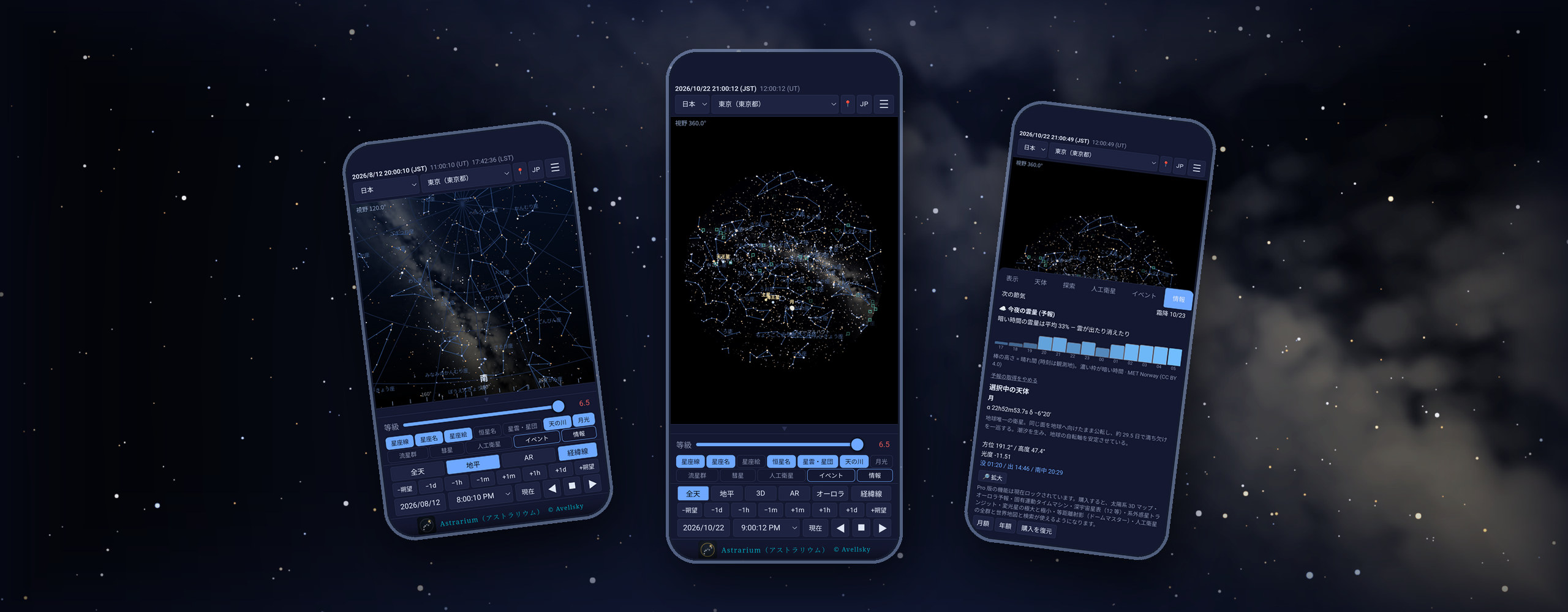
観測地と日時を決めれば、その場所・その時刻の空をそのまま描くプラネタリウムです。 天体の位置計算はすべて端末の中で行うため、電波の届かない観測地でも全機能が動きます。 広告もアカウント登録もありません。下に挙げたものはすべて無料で、期間の制限も ありません(Astrarium Pro は、同じアプリの中の任意の購読です)。
AR(カメラ映像に星図を重ねる)と、宇宙ステーション・肉眼で 見える人工衛星(4 等まで)も無料で使えます。
Astrarium Pro(アプリ内課金)では、これに太陽系3Dマップ (小惑星・彗星・準惑星・探査機)、オーロラ予報、固有運動タイムマシン(±5 万年)、 深宇宙星表(12 等まで 234 万星)、系外惑星のトランジットと変光星の予報、残りの 人工衛星の群と世界地図・地球儀・検索、等距離射影(ドームマスター)が加わります。 入口は施錠された状態で同じ場所にあり、何が増えるのかが分かるようになっています。 月額 400 円 / 年額 4,000 円(日本の場合。価格は国・地域により異なります)。 最初の 1 週間は無料です。
いいえ。上段バーの位置情報ボタンから場所設定の画面を開き、地図で合わせるか、 緯度・経度・標高を打ち込むか、観測地の一覧から選べば、すべての機能を同じように 使えます。位置情報は、その場所の空を計算するためだけに使い、端末の外へは 送信しません。
使えます。星表・暦・計算エンジンをすべて内蔵しています。通信するのは、 彗星・小惑星の軌道要素をご自身でボタンを押して取得するときだけです (人工衛星の軌道要素とオーロラ予報も、同じくボタンを押したときだけです)。
アプリ内の「情報」タブ →「クレジット・出典」に、データセットごとの出典・版・ ライセンス・取得日を掲載しています。
お使いの機種・iOS のバージョン・再現手順を添えてメールでお知らせください。 可能であればスクリーンショットもいただけると助かります。
Questions and bug reports: avellsky@gmail.com. Replies may take a few days.
iPhone and iPad (Apple Watch: chapter 12)
Android
Mac
Astrarium Pro (in-app subscription; iPhone and iPad)
Screen by screen: driving the chart, the meteor-rate model and the printable PNG/PDF export, illustrated with screenshots. The Mac edition is a separate book, written around the docked side panel and the mouse and trackpad. The Pro manual adds chapters on the 3D solar system map, the aurora forecast, the proper-motion time machine and the deep star catalogue.
Install Astrarium on iPhone and it goes to the Apple Watch with it — there is nothing more to buy (watchOS 10.0 or later). There are two screens.
Stars and constellation lines are computed on the watch itself; the Sun, Moon, planets and satellites are solved on the iPhone and sent across. The bottom line says how old the figures are, and says so plainly while the iPhone is out of range. Chapter 12 of the iPhone and iPad manual covers it.
Choose a place and a time and Astrarium draws that sky. Every position is computed on the device, so the whole app works where there is no signal. No ads, no account. Everything below is free, with no time limit (Astrarium Pro is an optional subscription inside the same app).
AR — the chart drawn over the camera image — is free too, as are the space stations and the naked-eye satellites to magnitude 4.
Astrarium Pro, an in-app subscription, adds the 3D solar system map (asteroids, comets, dwarf planets and spacecraft), the aurora forecast, the proper-motion time machine (50,000 years either way), the deep star catalogue (2.34 million stars to 12th magnitude), exoplanet transits and variable stars, the remaining satellite groups with a world map, a globe and search, and the equidistant (dome master) projection. The entry points stay where they are, locked, so you can see what they are. US$3.99 a month or US$39.99 a year (United States; prices vary by region). The first week is free.
No. The location button in the top bar opens the site screen: drag the map to the spot, type the latitude, longitude and altitude, or pick from the bundled list. Location, when granted, is used only to compute the local sky and never leaves the device.
Yes. The catalogues, the ephemeris and the compute engine are all inside the app. It contacts the network only when you press the button that fetches comet and asteroid elements — and likewise for satellite elements and the aurora forecast.
Info → Credits lists every dataset with its source, version, licence and the date it was retrieved.
Email the device model, the iOS version and how to reproduce it — a screenshot helps.